GTA IV Modding Tutorials
1. Making GTA IV moddable:
Unfortunately, at the beginning there is no way to modify GTA IV files, because the game is in "read-only" mode. In order to be able to install mods, you need to install Xlive Less (supports v1.0.7.0!) (DOWNLOAD)
Installation of Xlive Less:
- Unpack the file xlive.dll into the game folder (don't forget to remove the asi loader if there is one)
- Optional: To turn on debug logging, unpack xlive_d.dll into the game folder and rename it to xlive.dll
- Start the game
2. Installing text file mods:
Lots of information of GTA IV are stored in text files. This is an overview of the most important ones:
- carcols.dat - specifies colors of cars
- cargrp.dat - specifies groups of cars and peds. Only police officers drive police cars
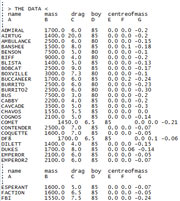
- handling.dat - provides information about the handling of cars (weight, horsepower, etc)
- timecyc.dat - data of the weather conditions
- vehicles.ide - determines where and how often specific cars appear
- visualsettings.dat - contains information about visual effects like rain
- WeaponInfo.xml - data of weapons (ammunition, fire rate, etc)
Most of these text file mods have to be installed by replacing the existing files. Make sure your GTA IV is moddable first!
3. Installing texture mods:
Almost all objects in-game use textures. Mods can be released in two ways: as .wtd/.wdr archives used by GTA IV, or as individual PNG files.
Tools to edit GTA IV archives:
4. Installing vehicle mods:
We have a separate tutorial explaining vehicle mod installation. Click here.