San Andreas / Tools / Tool lainnya
DFF Scope
- DraigNET Studios | di-upload oleh DraigNET
- draignet.uk
- 08/18/2026 (Last Update: 09/09/2026)
- 598 Jumlah download
Rating:
Login dulu, ya.
Favorit:
Videos
Belum ada video yang ditambahkan.Kamu harus login untuk menambahkan video ke mod ini.
Deskripsi
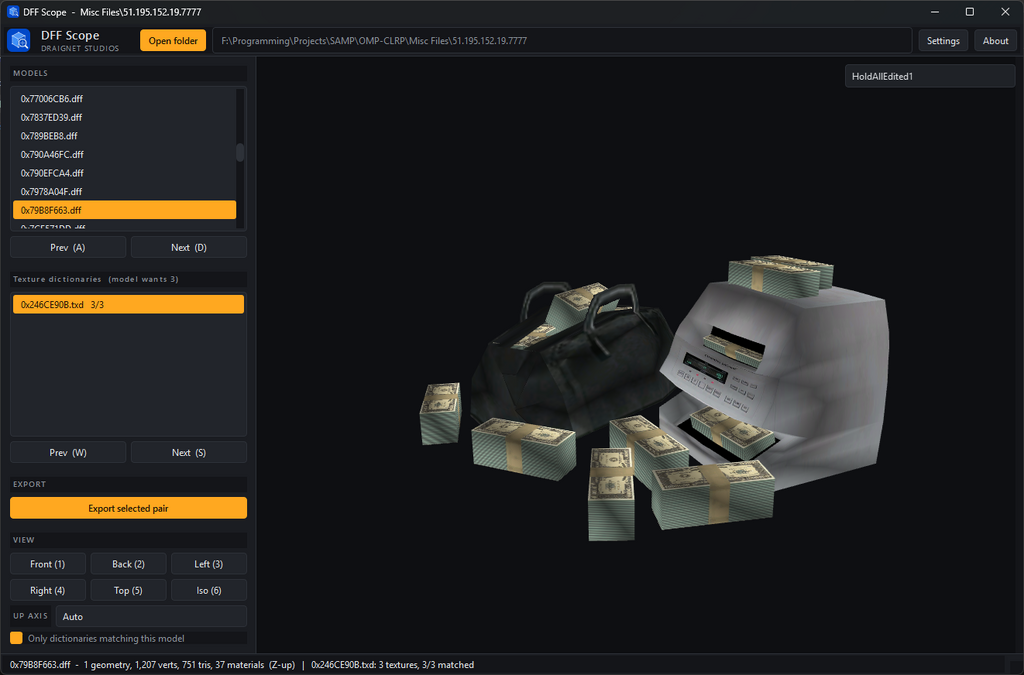
DFF Scope 1.1 is a standalone viewer for GTA San Andreas DFF models and TXD texture dictionaries. Point it at a folder, click through the models, and see them textured in 3D. No install and no dependencies — unzip and run the exe.
It was written to solve one specific annoyance: server download caches store files under hashed names like 0x1D9252D1.dff and 0x35F43E1C.txd, so there is no way to tell which texture dictionary belongs to which model by looking at the filenames, and opening them one pair at a time to find out is slow going.
Automatic texture matching
DFF materials and TXD textures both keep their original internal names even when the files themselves are renamed. DFF Scope indexes every dictionary in the folder on load and ranks them by how many of the selected model's textures they actually contain, showing the score beside each one (for example 5/5). The correct dictionary is usually already selected by the time the model finishes loading.
If you want to try others, W and S step through the list, and a checkbox hides dictionaries that share nothing with the current model.
Correct material splitting
San Andreas leaves the material ID at zero on every triangle in a DFF's triangle list and stores the real per-material split in the Bin Mesh PLG extension instead. DFF Scope reads that extension, so a model with twelve materials is drawn with twelve textures rather than having its first texture smeared across the whole mesh. Both triangle lists and tristrips are handled.
Features
- Browse a whole folder of DFFs, stepping through with A and D
- Automatic TXD matching by internal texture name, with match scores
- Export the selected DFF/TXD pair to an Export folder, with optional rename before copying
- View internal DFF object names, such as laeJeffers06 or lasmall1_sv, in the dropdown at the top-right of the viewport
- Change the viewport background colour from Settings using RGB sliders, number inputs, a colour picker and reset
- Hardware-accelerated 3D view (OpenGL 3.3): orbit, zoom and pan
- Six camera presets — front, back, left, right, top and isometric
- Up-axis detection with a manual override. Buildings are stored Z-up but ped geometry lies along X, so models do not agree on which way is up
- Wireframe toggle
- Per-model readout: geometries, vertices, triangles, materials, and which of the model's textures the current dictionary is missing
- Dark interface, remembers the last folder you used
Version 1.1 update
- Added export for the currently selected DFF and TXD pair. Exports are copied into the Export folder beside the app.
- Added an export rename dialog. Enter one name to save matching .dff and .txd filenames, or untick the shared-name option to rename them separately.
- Added viewport background colour settings in a Settings dialog on the top toolbar, next to About.
- Added internal DFF object-name detection and a viewport dropdown for names like lasmall1_sv.
- Kept skeleton/bone names out of that dropdown, so ped files do not fill it with entries like Root, Pelvis and Spine.
Controls
Left drag Orbit A / D Previous / next model Right drag Pan W / S Previous / next dictionary Mouse wheel Zoom F Frame the model Ctrl+O Open folder T Wireframe 1–6 Camera presets
Requirements
Windows, and a GPU supporting OpenGL 3.3 (anything from 2010 onward). Nothing to install — unzip and run DFF Scope.exe.
What it does not do
This is a viewer, not an editor or a converter. It does not modify or convert the files you open. Export copies the selected DFF/TXD pair into a separate Export folder and leaves the originals untouched.
It is built for skins and map/object models, which are single-geometry. Multi-part models such as vehicles are drawn without their frame transforms, so separate parts appear at the origin rather than in their assembled positions. Skeletal data is read past rather than applied, so skinned models show their bind pose. Collision files (COL) and animations (IFP) are not supported.
Under the hood
The RenderWare parser is written from scratch and reads the binary stream directly — chunk walker, clump and geometry list, materials, and the texture dictionary decoders. Nothing is shelled out to another tool, and no game files are needed beyond the ones you open.
Rendering is OpenGL 3.3 with one draw call per material, so what you see on screen is the model's real material breakdown rather than an approximation.
Texture formats decoded: DXT1, DXT3, DXT5, uncompressed 32-bit BGRA, 16-bit 1555, and 8-bit paletted. The base mip level is used.
Tested against 767 model files and 646 texture dictionaries.
DraigNET Studios
Komentar
Sudah ada 4 komentar.