San Andreas / Mod / Bangunan
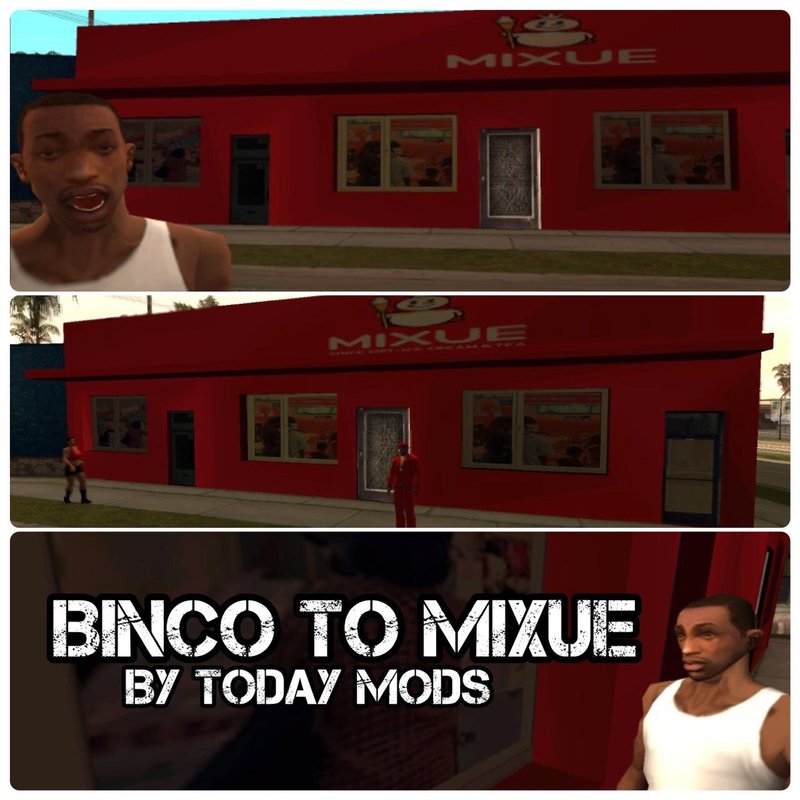
Binco to Mixue Store Mod
- TODAYMODS | di-upload oleh TODAYMODS
- 12/18/2022
- 4035 Jumlah download
Rating:
Login dulu, ya.
Favorit:
Videos
Belum ada video yang ditambahkan.Kamu harus login untuk menambahkan video ke mod ini.
Deskripsi
Hello ! This is a mod that i made because i got bored, then i thinking that "what if mixue ice cream store get into los santos ?". Then, from just a question from my mind, turn into a mod. I made this mod just for 1 Hour, so i want to sorry if the building texture just filled with red color. But, because of this mod now you can see mixue store in Los Santos ! So how to install it? You can choose between these 2 options :
- Normal Mode
i can say this mode is easy, Because you only need to have "modloader" Mod and then move the "modloader" folder (in the Normal Mode folder) to your gta folder.
- Modder Mode
This option is a little bit difficult for beginners, because you have to use TXD Workshop. How to do it ?
- Open TXD Workshop
- click Open IMG
- Search your gta folder and then open "models" folder, you will find "gta3.img" file then click open
- on the left part, you can see a list of TXD files in "gta3.img" and you have to search a file named templae2land.txd then click it
- after you click the file, now you will see some files named "bincoslae2_128.png", "bincowin.png", "comptsign2_LAe.png", "comptwall10.png", and "LAstripmall1.png".
- Make sure all the file already in there, after you check all the files now press "import" Button then open modder mode folder
- clik the png file and replace the files that i said one by one
- done, just save the TXD and you ready to play !
Credit : Made By TODAYMODS
- Normal Mode
i can say this mode is easy, Because you only need to have "modloader" Mod and then move the "modloader" folder (in the Normal Mode folder) to your gta folder.
- Modder Mode
This option is a little bit difficult for beginners, because you have to use TXD Workshop. How to do it ?
- Open TXD Workshop
- click Open IMG
- Search your gta folder and then open "models" folder, you will find "gta3.img" file then click open
- on the left part, you can see a list of TXD files in "gta3.img" and you have to search a file named templae2land.txd then click it
- after you click the file, now you will see some files named "bincoslae2_128.png", "bincowin.png", "comptsign2_LAe.png", "comptwall10.png", and "LAstripmall1.png".
- Make sure all the file already in there, after you check all the files now press "import" Button then open modder mode folder
- clik the png file and replace the files that i said one by one
- done, just save the TXD and you ready to play !
Credit : Made By TODAYMODS
Komentar
Sudah ada 2 komentar.