San Andreas / Mod / Mod CLEO
Manual Respray Mod v1.1
- MKKJ | di-upload oleh MKKJ
- mkkjworkshop.blogspot.com
- 12/25/2016
- 16188 Jumlah download
Rating:
Login dulu, ya.
Favorit:
Videos

Kamu harus login untuk menambahkan video ke mod ini.
Deskripsi
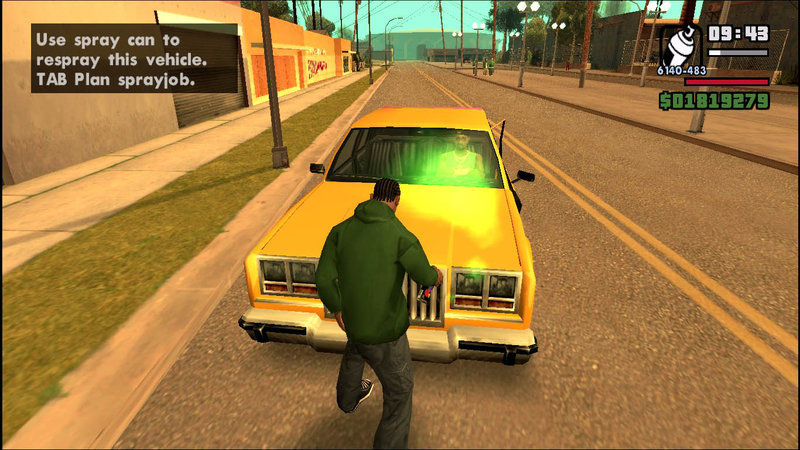
Respray vehicle yourself with spraycan and lose wanted level!
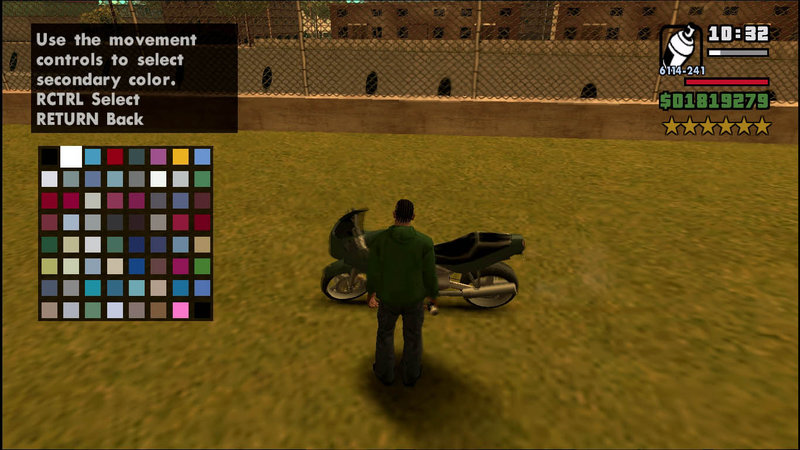
You can plan next spray color as well.
CONTROLS
- Simply use spray can near desired vehicle, might take a while to spray
- Plan next spray colors by pressing TAB near vehicle while holding spraycan
- To lose wanted level you must respray AND get in the vehicle without cops looking
BUGS & ISSUES
- Respray radius ignores vehicle's model size, which makes respraying big vehicles require player to stay as close as possible
VERSION HISTORY
v1.1
- Player can now continue respray their vehicle anytime, as long as player doesn't spray another vehicle or planning new sprayjob
- Fix bug where player can't spray their vehicle with unlimited ammo, either by cheat or 100% bonus
- Slightly increase repsray radius and respray duration.
You can plan next spray color as well.
CONTROLS
- Simply use spray can near desired vehicle, might take a while to spray
- Plan next spray colors by pressing TAB near vehicle while holding spraycan
- To lose wanted level you must respray AND get in the vehicle without cops looking
BUGS & ISSUES
- Respray radius ignores vehicle's model size, which makes respraying big vehicles require player to stay as close as possible
VERSION HISTORY
v1.1
- Player can now continue respray their vehicle anytime, as long as player doesn't spray another vehicle or planning new sprayjob
- Fix bug where player can't spray their vehicle with unlimited ammo, either by cheat or 100% bonus
- Slightly increase repsray radius and respray duration.
Komentar
Sudah ada 11 komentar.




01/08/2017 03:12
@glen0202
Okay, let's see...
- Primary/secondary paint job doesn't take effect immediately, you still have to spray it.
- You have to stay in certain radius while spraying, if you leave this radius, the sprayjob will 'reset'.
- Make sure the "Use spray can..." (or sprayjob plan) text stays on screen while spraying. It's the indicator that you're still in the radius.
Tell me more if its still not working
Kutip | Balas | (0)
@glen0202
Okay, let's see...
- Primary/secondary paint job doesn't take effect immediately, you still have to spray it.
- You have to stay in certain radius while spraying, if you leave this radius, the sprayjob will 'reset'.
- Make sure the "Use spray can..." (or sprayjob plan) text stays on screen while spraying. It's the indicator that you're still in the radius.
Tell me more if its still not working
Kutip | Balas | (0)
01/07/2017 23:20
Man, when I'm trying to respray a car nothing happens. I follow your instructions but I don't understand why I can't respray it.
Actually, I stand next to a car and I choose the primary and secondary colors for the job but it doesn't work. I have cleo 4.3 and the proper version of SA :(
Kutip | Balas | (0)
Man, when I'm trying to respray a car nothing happens. I follow your instructions but I don't understand why I can't respray it.
Actually, I stand next to a car and I choose the primary and secondary colors for the job but it doesn't work. I have cleo 4.3 and the proper version of SA :(
Kutip | Balas | (0)
