GTA III / Skin
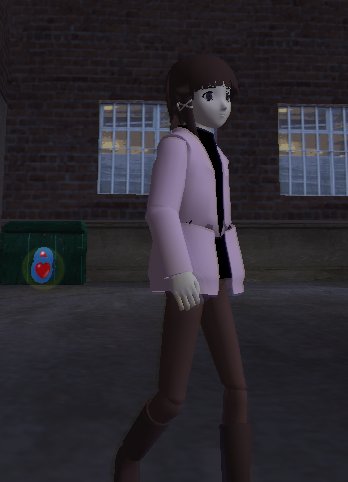
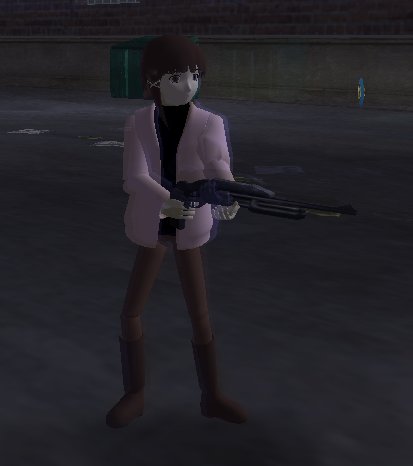
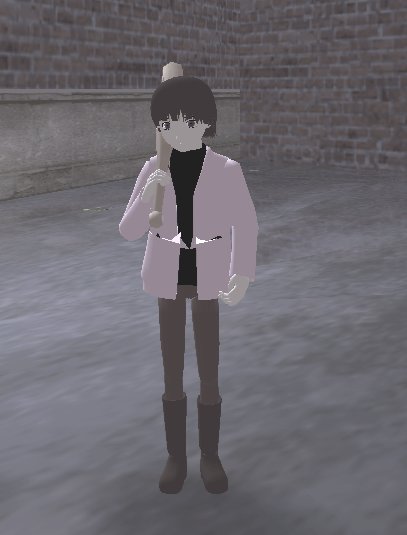
Lain Iwakura
- spaztron64
- twitter.com/spaztron64
- 12/27/2020
- 4907 Jumlah download
Rating:
Login dulu, ya.
Favorit:
Videos
Belum ada video yang ditambahkan.Kamu harus login untuk menambahkan video ke mod ini.
Deskripsi
Make me sad, make me mad.... Make me feel alright?
Installation and usage instructions:
Using IMGTool, put player.dff and player.txd in gta3.img (don't be cheeky and don't forget to back it up).
First delete the original files, then add the new files, and rebuild the archive.
Put text.bmp in the "skins" directory.
Pick it in GTA3's integrated skin selector.
Model created by IVatu: http://sprishri.nobody.jp/mmd_model1.html
!!!!NOT COMPATIBLE WITH ANDROID/IOS GTA3!!!!
Installation and usage instructions:
Using IMGTool, put player.dff and player.txd in gta3.img (don't be cheeky and don't forget to back it up).
First delete the original files, then add the new files, and rebuild the archive.
Put text.bmp in the "skins" directory.
Pick it in GTA3's integrated skin selector.
Model created by IVatu: http://sprishri.nobody.jp/mmd_model1.html
!!!!NOT COMPATIBLE WITH ANDROID/IOS GTA3!!!!
Komentar
Sudah ada 6 komentar.





12/29/2020 10:43
@MadoZZERX
Well, I don't. What I have to do is split the model into chunks to make it work with GTA 3's pivot point animation system, plus I have to readjust the UV mappings of every chunk to use a single texture (the one you choose in the player skin menu).
It's time consuming, prone to errors, and obviously leads to a different appearance if the original model was a skinned mesh, like in this case.
Kutip | Balas | (0)
@MadoZZERX
Well, I don't. What I have to do is split the model into chunks to make it work with GTA 3's pivot point animation system, plus I have to readjust the UV mappings of every chunk to use a single texture (the one you choose in the player skin menu).
It's time consuming, prone to errors, and obviously leads to a different appearance if the original model was a skinned mesh, like in this case.
Kutip | Balas | (0)